
Project Status Tracking and Reporting Tool
  • Status Reporting
  • KPI Radar
  • Strategic Foresight
  • Pricing
  • Resources
    • Blog
    • Product release
    • White Paper
    • Help Center

Contact us

Try it free
Project Status Tracking and Reporting Tool
  • Status Reporting
  • KPI Radar
  • Strategic Foresight
  • Pricing
  • About us
  • Resources
    • Blog
    • Product Release
    • White Paper
    • Help Center
  • Join Radar Team
  • Contact us
  • Try it free

Help Center

Quick Start

4
  • Radar overview
  • How to create a workspace?
  • How to set a workspace name?
  • What access levels / user roles are there?

Account Settings

4
  • How can I change the email address associated with my account?
  • How to reset my password?
  • How can I manage email notifications?
  • How can I delete my account?

Billing and Subscriptions

5
  • Where can I find information about the end date of my subscription?
  • How can I find out if I have reached my project limit in my workspace?
  • How can I know if my subscription has expired?
  • Where can I find information about my payments?
  • What payment options are available?

Fields and Configuration

4
  • What is a field? 
  • How to create a field
  • Field actions
  • Templates

Projects

8
  • How can I filter project data?
  • How to manage project-level permissions?
  • How to export the project list and project data?
  • How to add a project manually?
  • Everything on project connections
  • How to add a project by importing data from Excel?
  • How to add a project by importing data from Jira?
  • How to edit a project?

Views

5
  • What views are available?
  • How to create a view
  • How to share a view
  • How to copy a view?
  • How to delete a view?

Customization

3
  • Can I customize the Radar view?
  • Can I customize the tenant’s logo?
  • Can I change the preview image on the login screen?

Users

5
  • Invite new users to your workspace
  • How to edit a user
  • How to deactivate and delete users
  • Roles and permissions
  • How to create a user group

Status Reporting

2
  • Project status reporting
  • How to schedule and automate report releases?

Strategic Foresight

9
  • What is strategic foresight?
  • How to enable voting?
  • How to add voting results to a view?
  • How to estimate project parameters with a community?
  • How to view project parameters estimation results?
  • How to switch on iterating through signals using wizard?
  • How to make a view accessible to all workspace users?
  • How to share the common registration link?
  • How to participate in strategic foresight?

Chats and Notifications

2
  • How to use chats in Radar?
  • How to use notifications in Radar?
  • Home
  • Help center
  • Projects
  • How to add a project manually?
View Categories

How to add a project manually?

There are two ways to add a project to the Radar workspace. One is by filling in fields for each project individually, the other is by importing data directly from a supported source.

When entering a project manually, you can choose between using all fields that exist in the workspace and a template, composed of only a part of them. In both cases, the actual process of adding a project is the same.

To add a project:

1. Click the + button in the sidebar.
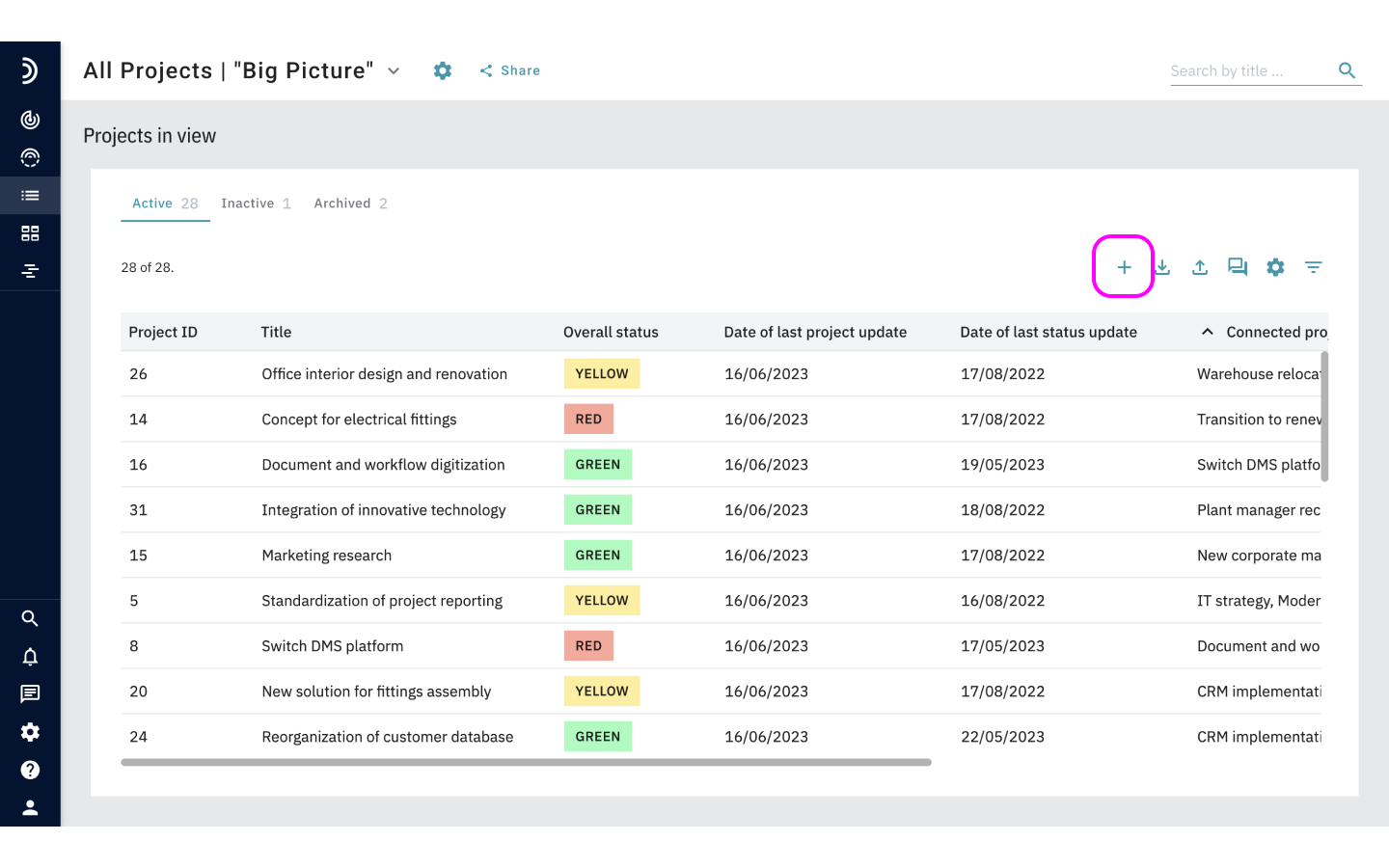
add new project

2. Enter a project title.

3. Fill out all fields marked with an asterisk – they are required.
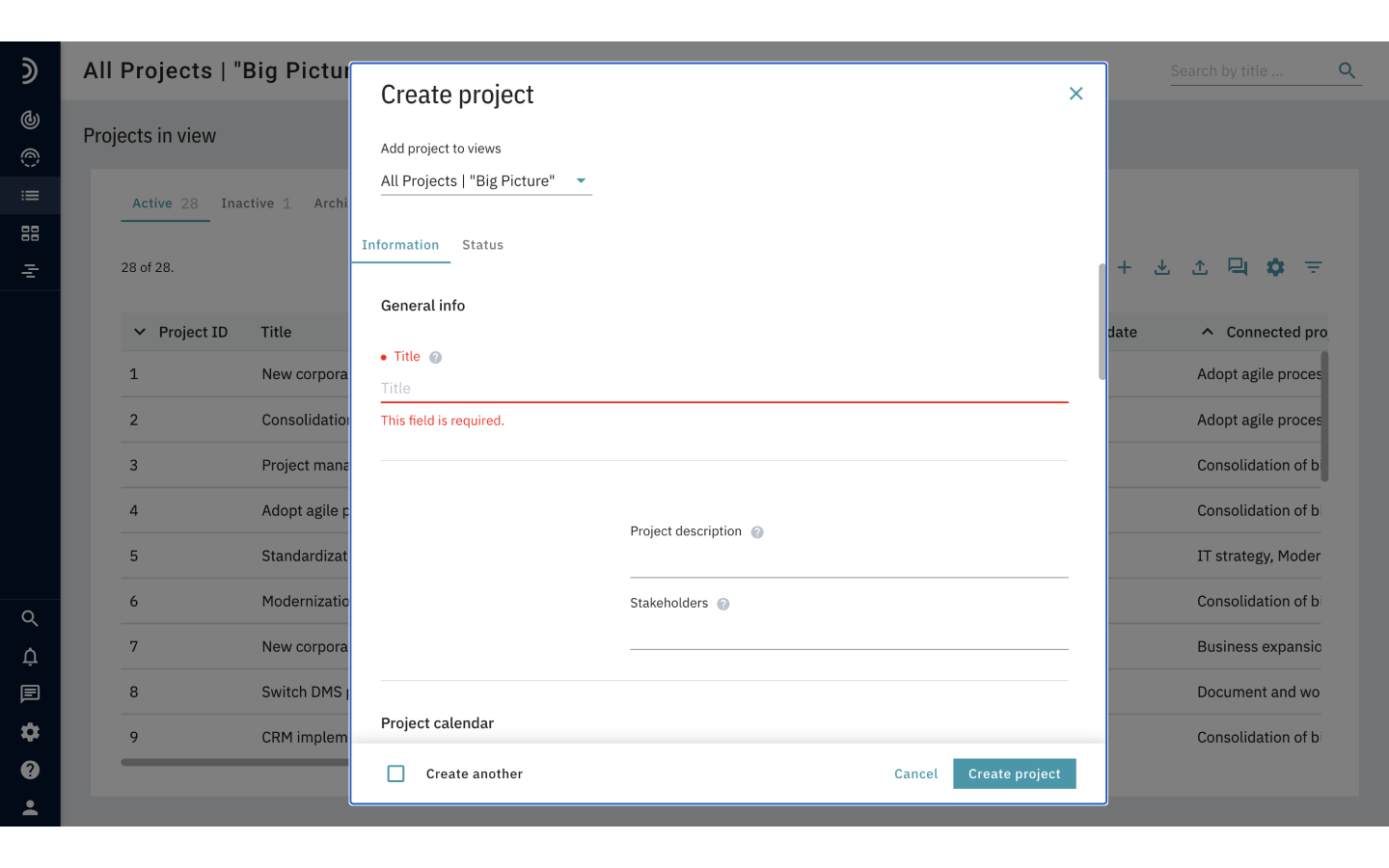
fill all fields

6. Optional: If there are views in the system to which you want to add your project, you can select them from the drop down list.

7. Click the Status tab and add more information about the project.

8. Optional: To immediately proceed to adding the next project that is structured in the same way, select the Create another checkbox at the bottom of the form.

9. Once you have filled all the applicable fields, click Create project.

Note

The structure of any project can be easily adjusted by switching the current template to any other template or the entire set of all fields. This action does not affect the entered data and is available both while a new project is being added and after it has been saved.

How to add a project by importing data from Jira?How to edit a project?
Projects Radar logo
  • Follow
  • Follow
  • Follow
  • Follow
  • Follow

PRODUCT

Status Reporting

KPI Radar

Strategic Foresight

Pricing

COMPANY

About us

Career

Contact us

RESOURCES

Blog

Product release

White paper

Help center

©2025. All Rights Reserved GET Information Technology GmbH | Rudolf-Diesel-Strasse 14, 41516 Grevenbroich, Germany

Terms of service      Privacy policy       Legal notice